GRAS嫦娥工程数据(PDS)2级数据处理
GRAS嫦娥工程数据(PDS)2级数据处理
Fairy.茯芺苒一、数据获取
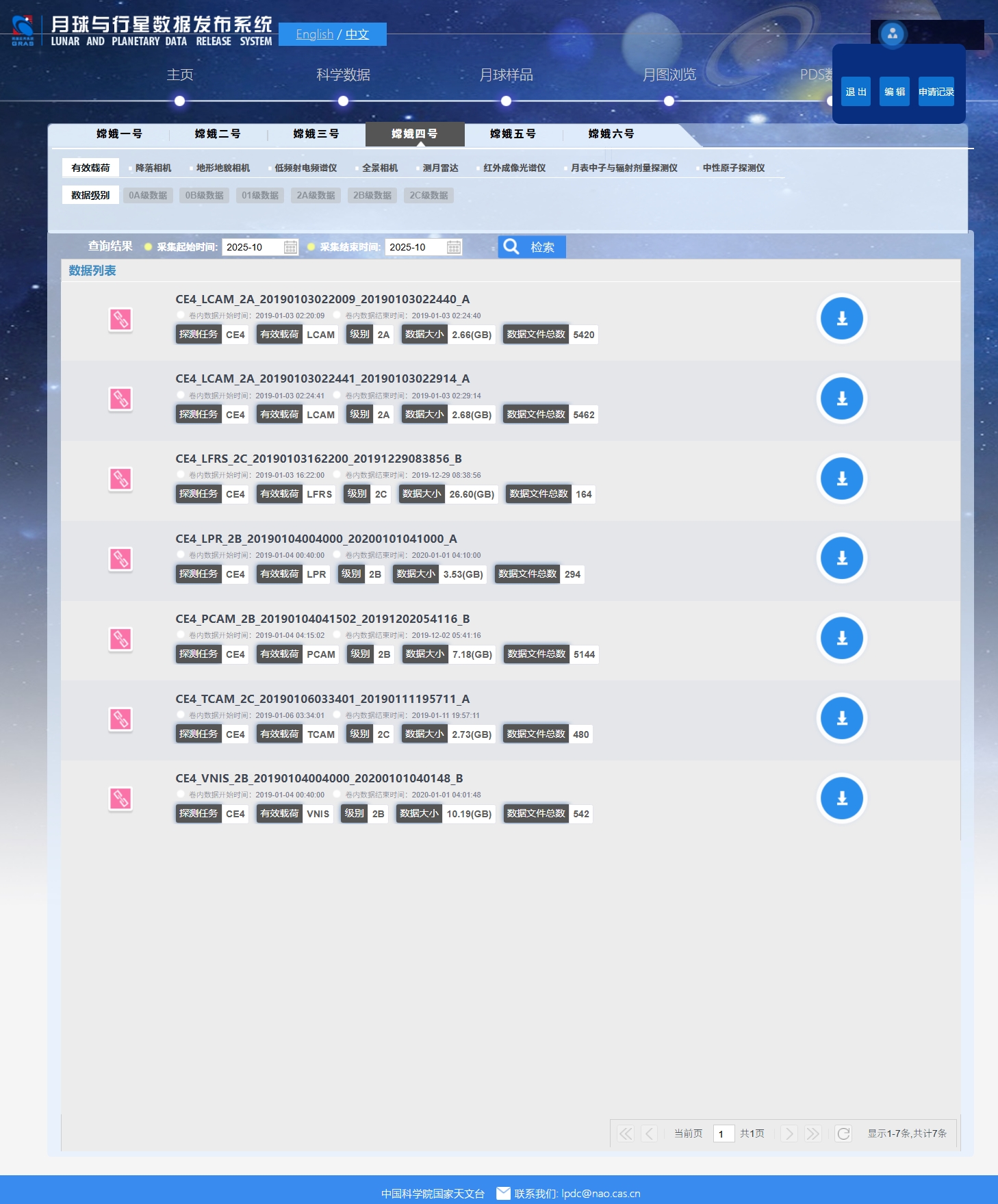
- 注册并登录:月球与行星探测工程数据服务与信息发布系统

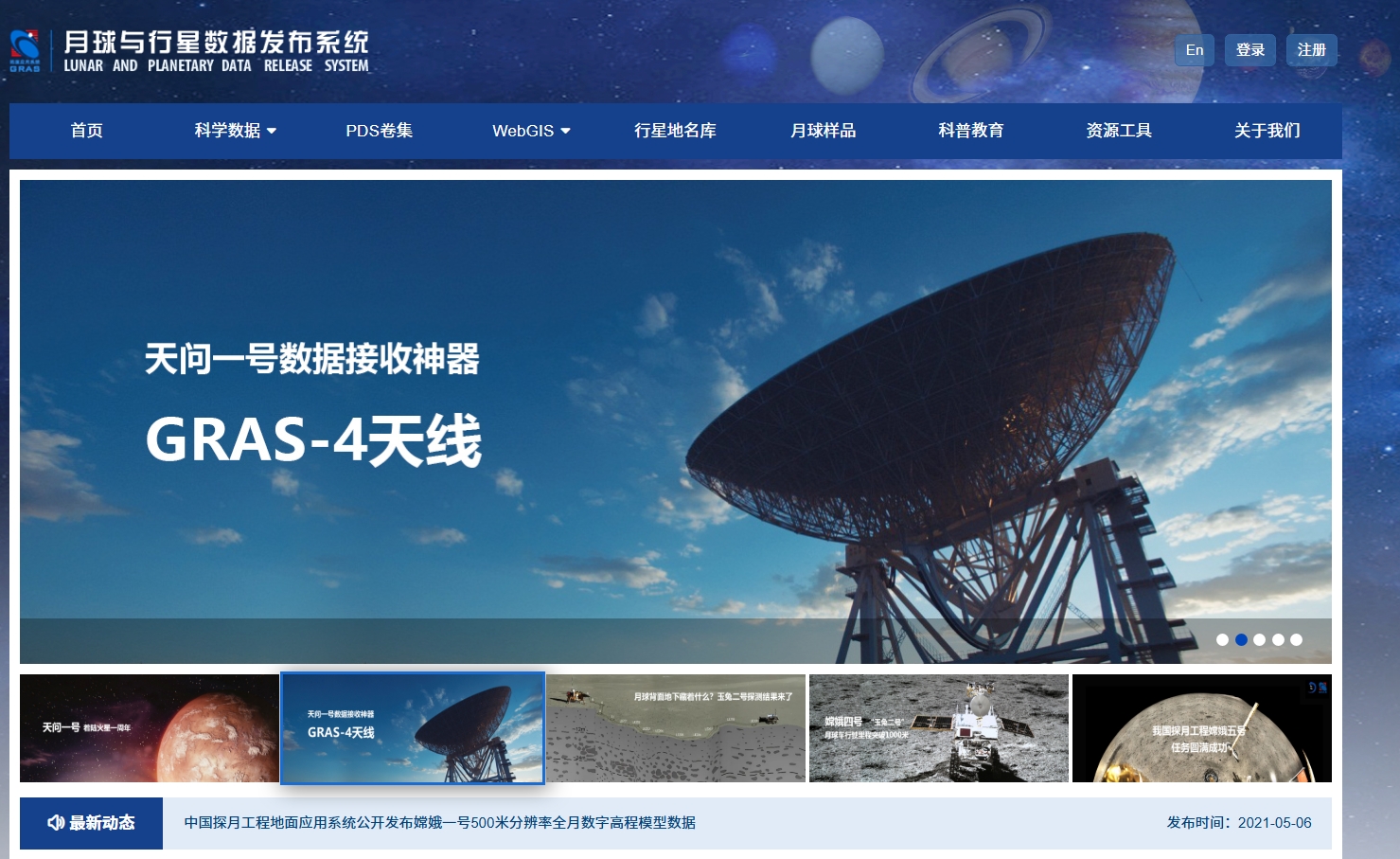
由于中国航天启动天问系列航天任务,网站首页名称由探月工程数据发布系统更名为月球与行星数据发布系统,探月工程被包含为页面一个子集,目前网站首页和数据检索页的账号系统是分开的,需要在数据检索页注册和登录账号,隶属于GRAS月球与行星探测工程地面应用系统
- 进入数据检索页面:月球与行星探测工程数据服务与信息发布系统-检索页面
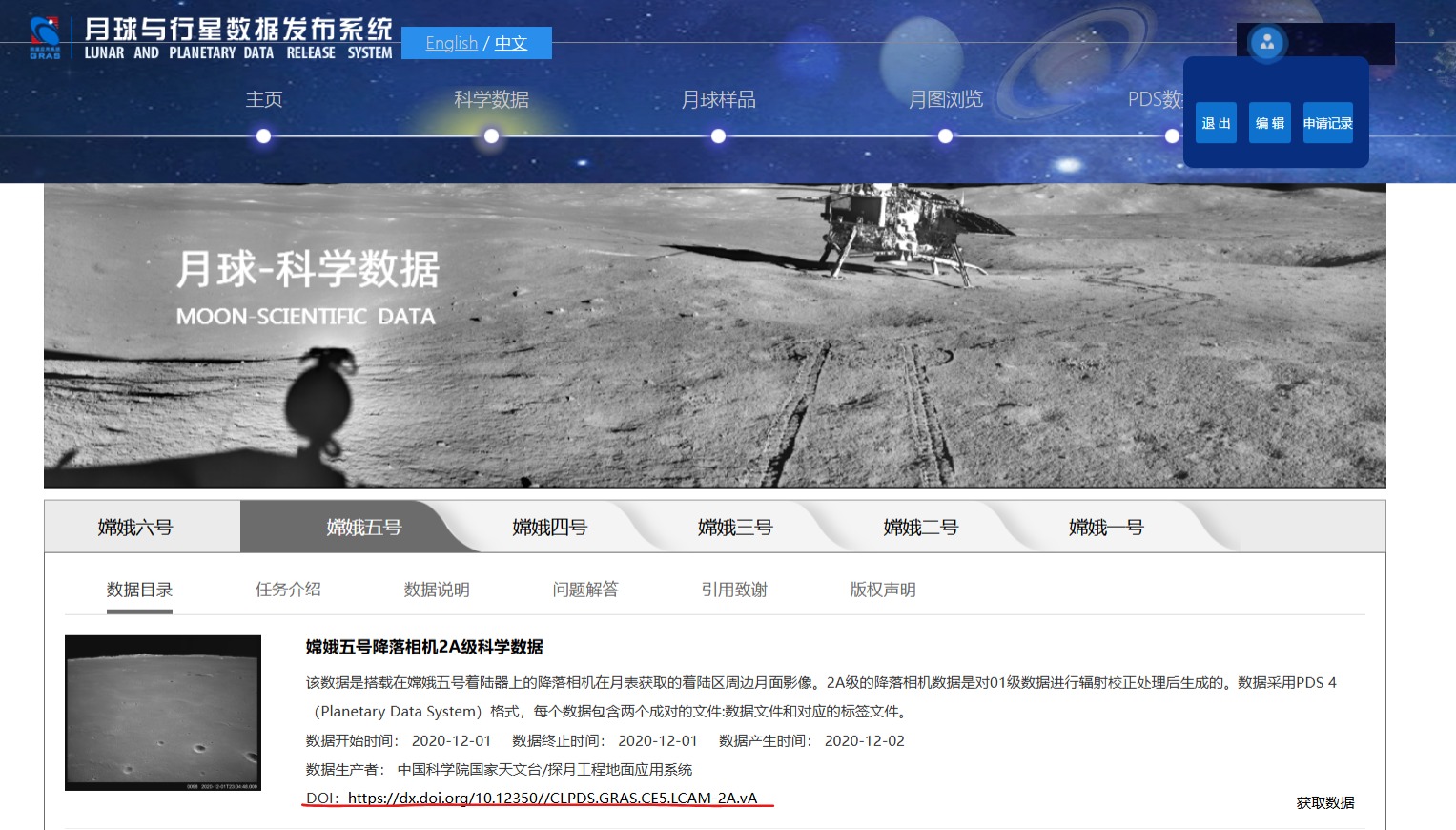
或者你可以下载PDS数据集:月球与行星探测工程数据服务与信息发布系统-PDS数据集
相应的介绍页面:月球与行星探测工程数据服务与信息发布系统-PDS数据集说明地图 - 下载数据文件,数据文件后缀为
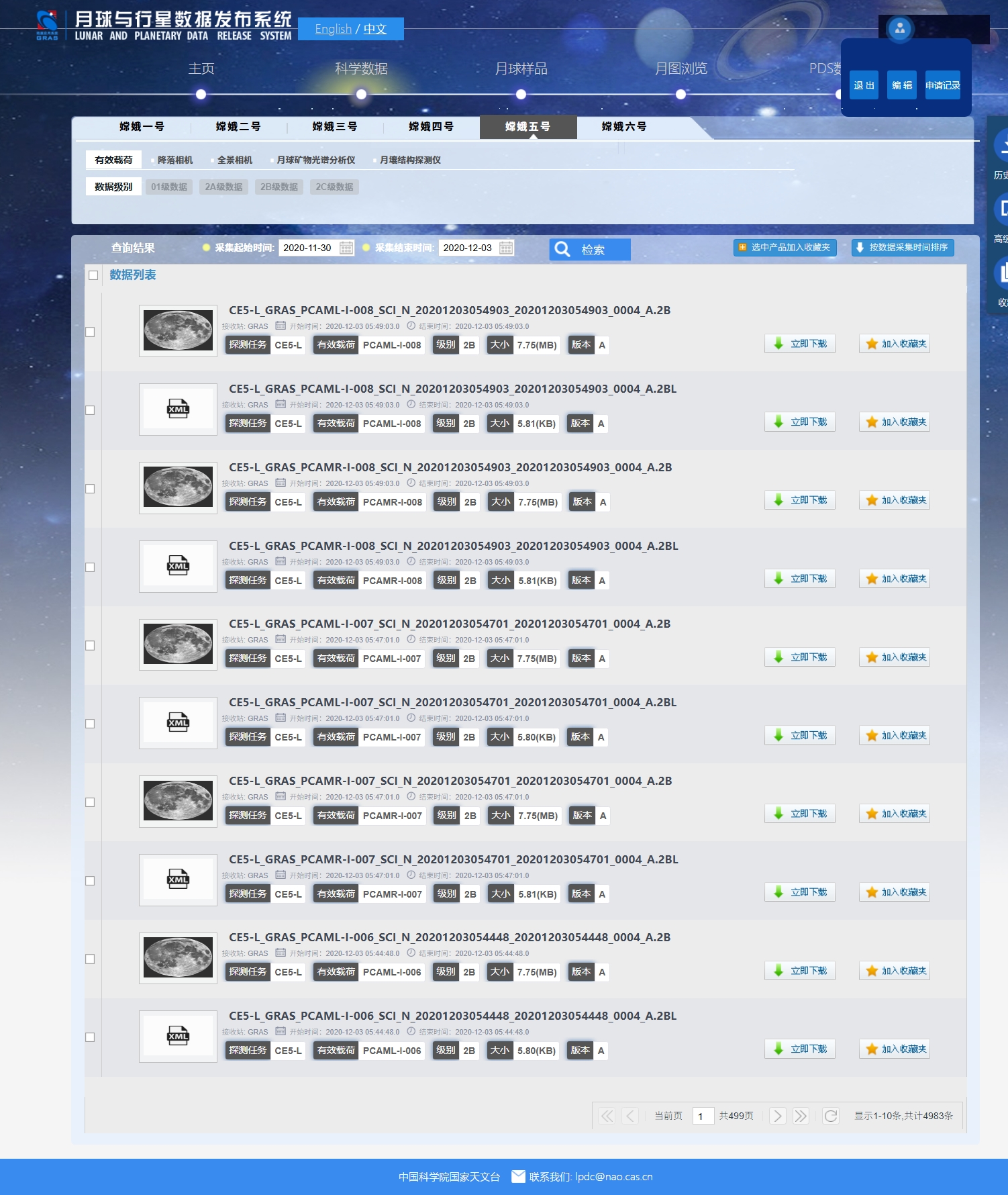
.2A和.2AL或.2B和.2BL或.2C和.2CL格式,其中2A、2B、2C是数据文件,2AL、2BL、2CL是数据标签XML文件,必须下载同名的.2A/B/C和.2AL/BL/CL文件才能正确处理。(如果缺失,有临时生成的方法)你也可以保存下载链接进行批量下载。
二、数据说明
文件名包含了任务标识、数据来源、探测仪器(科学载荷)缩写、数据产品类型、数据时间特性等信息
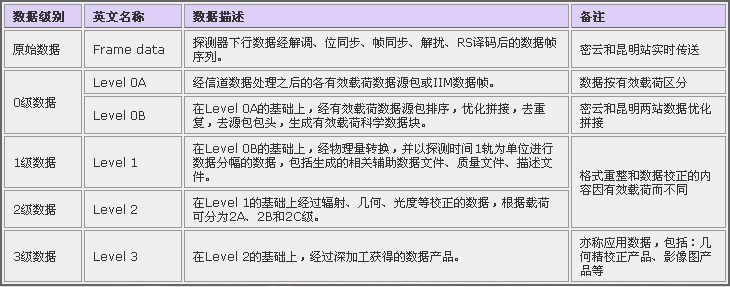
嫦娥探月工程的数据的组织形式就叫做PDS,是NASA开发的一种专门用于存储行星探索任务的数据系统。数据的后缀有.2A/.2AL、.2B/.2BL、.2C/.2CL,2AL/2BL/2CL文件是数据标签文件 ,拿记事本可以打开。里面记录了拍摄器材、拍摄时间和曝光参数等信息,最重要的是它存储了一个文件路径,也就是同名的2A/2B/2C文件。2A/2B/2C文件里面才是实际的图片数据。
首先嫦娥着陆器,玉兔月球车拍了照片,通过鹊桥中继卫星把数据发回来。观测站的天线大锅收到流数据,经过同步、解扰、解码、多站融合纠错后得到0级数据。分类整理并加入拍摄时间、参数等元信息后我们就有了1级数据。1级数据近似于我们用的相机拍的raw格式数据。2级数据的获取过程其实和深空拍摄的后期差不太多,2A大致是经过暗场、偏置场校正的,2B再做一步平场和镜头正畸,而2C是debayer之后的。
以嫦娥6号命名规则为例,给出详细的命名规则,其余大同小异。
其余数据产品文件命名规则参考:月球与行星探测工程数据服务与信息发布系统-PDS数据集说明地图
点击查看CE-6 数据产品文件命名规则
CE-6 数据产品文件命名规则
嫦娥六号数据产品文件名称使用如下格式(所有文件名称均采用大写字母):
1 | CEx_st_pl_ty_dc_yyyymmddhhmiss_YYYYMMDDHHMISS_ob_ver.lv |
文件名字段含义说明
| 字段 | 位置 | 含义 | 取值说明 |
|---|---|---|---|
| CEx | 1 | 任务标识 | 嫦娥六号着陆器取值为 CE6-L |
| st | 2 | 数据来源(接收站)编号 | 取值为 GRAS |
| pl | 3 | 探测仪器缩写 | 详见下方载荷名称缩写表 |
| ty | 4 | 数据产品类型 | 详见下方数据产品类型表 |
| dc | 5 | 数据时间特性 | 详见下方数据时间特性表 |
| yyyymmddhhmiss | 6 | 开始时间 | 世界时格式 |
| YYYYMMDDHHMISS | 7 | 结束时间 | 世界时格式 |
| ob | 8 | 探测周期序号 | 占4个字符 |
| ver | 9 | 产品版本 | 取值 A~Z,第一版为 ‘A’,最后一版为 ‘Z’ |
| lv | 10 | 产品级别 | 详见下方产品级别表 |
详细字段说明
探测仪器缩写 (pl)
| 载荷名称 | 文件名中的字段值 | 含义 |
|---|---|---|
| 全景相机 PCAM | PCAML-I | 全景相机左静态拍照 |
| 全景相机 PCAM | PCAMR-I | 全景相机右静态拍照 |
| 降落相机 LCAM | LCAM-1 | 降落相机模式1 |
| 降落相机 LCAM | LCAM-2 | 降落相机模式2 |
| 月壤结构探测仪 LRPR | LRPR-A | 月壤结构探测仪自动扫描 |
| 月球矿物光谱分析仪 LMS | LMS-S-D | 月球矿物光谱分析仪 短波光谱探测 |
| 月球矿物光谱分析仪 LMS | LMS-S-C | 月球矿物光谱分析仪 短波光谱定标 |
| 月球矿物光谱分析仪 LMS | LMS-C-D | 月球矿物光谱分析仪 可见波段探测 |
| 月球矿物光谱分析仪 LMS | LMS-C-C | 月球矿物光谱分析仪 可见波段定标 |
| 月球矿物光谱分析仪 LMS | LMS-N-D | 月球矿物光谱分析仪 近红外光谱探测 |
| 月球矿物光谱分析仪 LMS | LMS-N-C | 月球矿物光谱分析仪 近红外光谱定标 |
| 月球矿物光谱分析仪 LMS | LMS-M-D | 月球矿物光谱分析仪 中波光谱探测 |
| 月球矿物光谱分析仪 LMS | LMS-M-C | 月球矿物光谱分析仪 中波光谱定标 |
数据产品类型 (ty)
| 数据产品类型缩写 | 含义 |
|---|---|
SCI | 科学数据产品 |
AUX | 辅助数据产品 |
数据时间特性 (dc)
| 数据时间特性 | 含义 |
|---|---|
R | 实时数据 |
P | 回放数据 |
N | 不可分辨数据(混合数据) |
文件名时间码含义
- 1级数据:文件名起止时间为探测周期的起止时间(世界时)
- 2级数据:文件名起止时间为实际数据起止时间,图像数据起止时间相同,皆为本帧图像的时间(世界时)
产品级别 (lv)
| 产品级别 | 含义 |
|---|---|
01 | 1级科学数据产品 |
01L | 1级数据产品标签 |
2A | 2A级数据产品 |
2AL | 2A级数据产品标签 |
2B | 2B级数据产品 |
2BL | 2B级数据产品标签 |
三、数据处理
方法一、使用Python中pds4-tools库对2级数据进行处理
环境依赖
Python 3.16.13
如果你使用anacoda可以参考下列对虚拟环境的配置
1 | conda create -n changE python=3.6 |
依赖列表
| Name | Version | Build | Channel |
|---|---|---|---|
| backcall | 0.2.0 | pyh9f0ad1d_0 | conda-forge |
| backports | 1.0 | pyhd8ed1ab_4 | conda-forge |
| backports.functools_lru_cache | 2.0.0 | pyhd8ed1ab_0 | conda-forge |
| blas | 1.0 | mkl | https://mirrors.ustc.edu.cn/anaconda/pkgs/main |
| ca-certificates | 2025.9.9 | haa95532_0 | https://mirrors.ustc.edu.cn/anaconda/pkgs/main |
| certifi | 2021.5.30 | py36haa95532_0 | https://mirrors.ustc.edu.cn/anaconda/pkgs/main |
| cloudpickle | 2.0.0 | pyhd3eb1b0_0 | https://mirrors.ustc.edu.cn/anaconda/pkgs/main |
| colorama | 0.4.5 | pyhd8ed1ab_0 | conda-forge |
| colour-demosaicing | 0.1.6 | pypi_0 | pypi |
| colour-science | 0.3.16 | pypi_0 | pypi |
| cycler | 0.11.0 | pyhd3eb1b0_0 | https://mirrors.ustc.edu.cn/anaconda/pkgs/main |
| cytoolz | 0.11.0 | py36he774522_0 | https://mirrors.ustc.edu.cn/anaconda/pkgs/main |
| dask-core | 2021.3.0 | pyhd3eb1b0_0 | https://mirrors.ustc.edu.cn/anaconda/pkgs/main |
| decorator | 5.1.1 | pyhd8ed1ab_0 | conda-forge |
| entrypoints | 0.4 | pyhd8ed1ab_0 | conda-forge |
| freetype | 2.13.3 | h0620614_0 | https://mirrors.ustc.edu.cn/anaconda/pkgs/main |
| giflib | 5.2.2 | h7edc060_0 | https://mirrors.ustc.edu.cn/anaconda/pkgs/main |
| icc_rt | 2022.1.0 | h6049295_2 | https://mirrors.ustc.edu.cn/anaconda/pkgs/main |
| icu | 58.2 | ha925a31_3 | https://mirrors.ustc.edu.cn/anaconda/pkgs/main |
| imageio | 2.15.0 | pypi_0 | pypi |
| intel-openmp | 2025.0.0 | haa95532_1164 | https://mirrors.ustc.edu.cn/anaconda/pkgs/main |
| ipykernel | 5.5.5 | py36hfacbf0b_0 | conda-forge |
| ipython | 7.16.1 | py36h7b2dad6_2 | conda-forge |
| ipython_genutils | 0.2.0 | pyhd8ed1ab_1 | conda-forge |
| jedi | 0.17.2 | py36ha15d459_1 | conda-forge |
| jpeg | 9f | ha349fce_0 | https://mirrors.ustc.edu.cn/anaconda/pkgs/main |
| jupyter_client | 7.1.2 | pyhd8ed1ab_0 | conda-forge |
| jupyter_core | 4.8.1 | py36ha15d459_0 | conda-forge |
| kiwisolver | 1.3.1 | py36hd77b12b_0 | https://mirrors.ustc.edu.cn/anaconda/pkgs/main |
| lerc | 3.0 | hd77b12b_0 | https://mirrors.ustc.edu.cn/anaconda/pkgs/main |
| libdeflate | 1.17 | h2bbff1b_1 | https://mirrors.ustc.edu.cn/anaconda/pkgs/main |
| libpng | 1.6.39 | h8cc25b3_0 | https://mirrors.ustc.edu.cn/anaconda/pkgs/main |
| libsodium | 1.0.18 | h8d14728_1 | conda-forge |
| libtiff | 4.5.1 | hd77b12b_0 | https://mirrors.ustc.edu.cn/anaconda/pkgs/main |
| libwebp | 1.3.2 | hbc33d0d_0 | https://mirrors.ustc.edu.cn/anaconda/pkgs/main |
| libwebp-base | 1.3.2 | h3d04722_1 | https://mirrors.ustc.edu.cn/anaconda/pkgs/main |
| libzlib | 1.3.1 | h02ab6af_0 | https://mirrors.ustc.edu.cn/anaconda/pkgs/main |
| lz4-c | 1.9.4 | h2bbff1b_1 | https://mirrors.ustc.edu.cn/anaconda/pkgs/main |
| matplotlib | 3.3.4 | py36haa95532_0 | https://mirrors.ustc.edu.cn/anaconda/pkgs/main |
| matplotlib-base | 3.3.4 | py36h49ac443_0 | https://mirrors.ustc.edu.cn/anaconda/pkgs/main |
| mkl | 2020.2 | 256 | https://mirrors.ustc.edu.cn/anaconda/pkgs/main |
| mkl-service | 2.3.0 | py36h196d8e1_0 | https://mirrors.ustc.edu.cn/anaconda/pkgs/main |
| mkl_fft | 1.3.0 | py36h46781fe_0 | https://mirrors.ustc.edu.cn/anaconda/pkgs/main |
| mkl_random | 1.1.1 | py36h47e9c7a_0 | https://mirrors.ustc.edu.cn/anaconda/pkgs/main |
| nest-asyncio | 1.6.0 | pyhd8ed1ab_0 | conda-forge |
| networkx | 2.5 | py_0 | https://mirrors.ustc.edu.cn/anaconda/pkgs/main |
| numpy | 1.19.5 | pypi_0 | pypi |
| numpy-base | 1.19.2 | py36ha3acd2a_0 | https://mirrors.ustc.edu.cn/anaconda/pkgs/main |
| olefile | 0.46 | pyhd3eb1b0_0 | https://mirrors.ustc.edu.cn/anaconda/pkgs/main |
| openssl | 1.1.1w | h2bbff1b_0 | https://mirrors.ustc.edu.cn/anaconda/pkgs/main |
| parso | 0.7.1 | pyh9f0ad1d_0 | conda-forge |
| pds4-tools | 1.2 | pypi_0 | pypi |
| pickleshare | 0.7.5 | py_1003 | conda-forge |
| pillow | 8.4.0 | pypi_0 | pypi |
| pip | 21.2.2 | py36haa95532_0 | https://mirrors.ustc.edu.cn/anaconda/pkgs/main |
| prompt-toolkit | 3.0.36 | pyha770c72_0 | conda-forge |
| pygments | 2.14.0 | pyhd8ed1ab_0 | conda-forge |
| pyparsing | 3.0.4 | pyhd3eb1b0_0 | https://mirrors.ustc.edu.cn/anaconda/pkgs/main |
| pyqt | 5.9.2 | py36h6538335_2 | https://mirrors.ustc.edu.cn/anaconda/pkgs/main |
| python | 3.6.13 | h3758d61_0 | https://mirrors.ustc.edu.cn/anaconda/pkgs/main |
| python-dateutil | 2.8.2 | pyhd8ed1ab_0 | conda-forge |
| python_abi | 3.6 | 2_cp36m | conda-forge |
| pywavelets | 1.1.1 | py36he774522_2 | https://mirrors.ustc.edu.cn/anaconda/pkgs/main |
| pywin32 | 301 | py36h68aa20f_0 | conda-forge |
| pyyaml | 5.4.1 | py36h2bbff1b_1 | https://mirrors.ustc.edu.cn/anaconda/pkgs/main |
| pyzmq | 22.3.0 | py36h1d5d788_0 | conda-forge |
| qt | 5.9.7 | vc14h73c81de_0 | https://mirrors.ustc.edu.cn/anaconda/pkgs/main |
| scikit-image | 0.17.2 | py36h1e1f486_0 | https://mirrors.ustc.edu.cn/anaconda/pkgs/main |
| scipy | 1.5.4 | pypi_0 | pypi |
| setuptools | 58.0.4 | py36haa95532_0 | https://mirrors.ustc.edu.cn/anaconda/pkgs/main |
| sip | 4.19.8 | py36h6538335_0 | https://mirrors.ustc.edu.cn/anaconda/pkgs/main |
| six | 1.17.0 | pypi_0 | pypi |
| sqlite | 3.50.2 | hda9a48d_1 | https://mirrors.ustc.edu.cn/anaconda/pkgs/main |
| tifffile | 2020.10.1 | py36h8c2d366_2 | https://mirrors.ustc.edu.cn/anaconda/pkgs/main |
| tk | 8.6.15 | hf199647_0 | https://mirrors.ustc.edu.cn/anaconda/pkgs/main |
| toolz | 0.11.2 | pyhd3eb1b0_0 | https://mirrors.ustc.edu.cn/anaconda/pkgs/main |
| tornado | 6.1 | py36h68aa20f_1 | conda-forge |
| traitlets | 4.3.3 | pyhd8ed1ab_2 | conda-forge |
| ucrt | 10.0.22621.0 | haa95532_0 | https://mirrors.ustc.edu.cn/anaconda/pkgs/main |
| vc | 14.3 | h2df5915_10 | https://mirrors.ustc.edu.cn/anaconda/pkgs/main |
| vc14_runtime | 14.44.35208 | h4927774_10 | https://mirrors.ustc.edu.cn/anaconda/pkgs/main |
| vs2015_runtime | 14.44.35208 | ha6b5a95_10 | https://mirrors.ustc.edu.cn/anaconda/pkgs/main |
| wcwidth | 0.2.10 | pyhd8ed1ab_0 | conda-forge |
| wheel | 0.37.1 | pyhd3eb1b0_0 | https://mirrors.ustc.edu.cn/anaconda/pkgs/main |
| wincertstore | 0.2 | py36h7fe50ca_0 | https://mirrors.ustc.edu.cn/anaconda/pkgs/main |
| xz | 5.6.4 | h4754444_1 | https://mirrors.ustc.edu.cn/anaconda/pkgs/main |
| yaml | 0.2.5 | he774522_0 | https://mirrors.ustc.edu.cn/anaconda/pkgs/main |
| zeromq | 4.3.4 | h0e60522_1 | conda-forge |
| zlib | 1.3.1 | h02ab6af_0 | https://mirrors.ustc.edu.cn/anaconda/pkgs/main |
| zstd | 1.5.7 | h56299aa_0 | https://mirrors |
安装第三方库
使用pip命令和conda命令安装第三方库
1 | pip install --upgrade pip |
导入库
1 | from pds4_tools import pds4_read |
灰度图像
1 | path = './input/文件名.2CL' |
- 输出示例
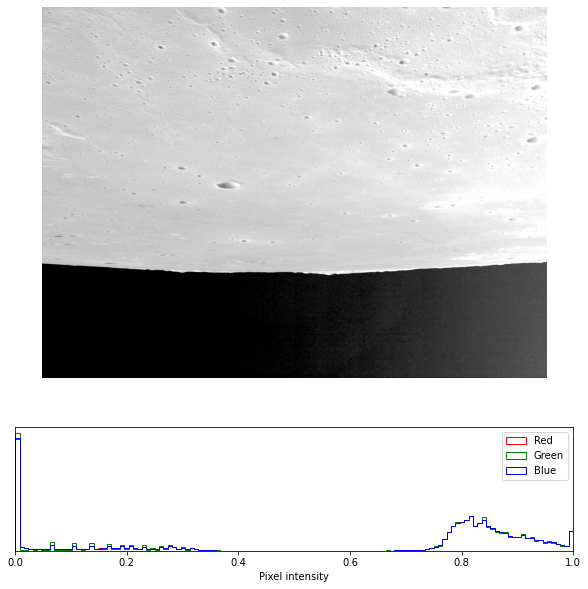
灰度图+直方图
1 | def read_pds(path): |
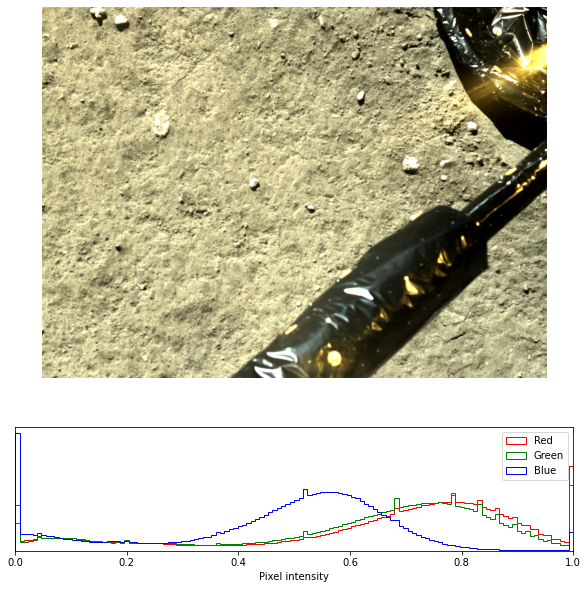
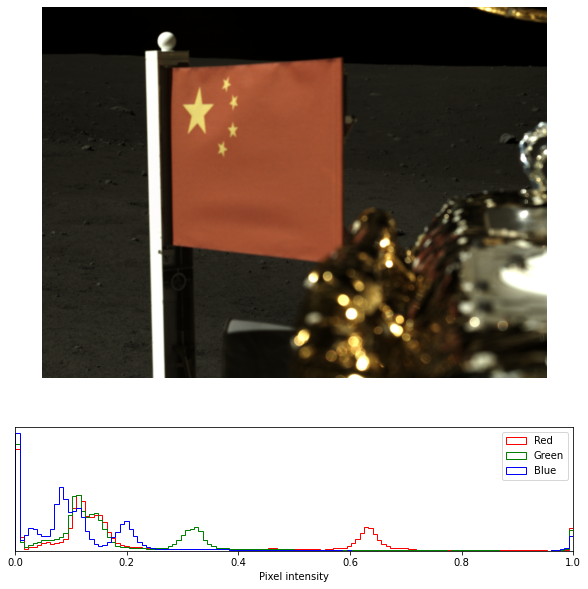
彩色图
1 | def debayer_img(img, CFA='RGGB'): |
- 输出示例
查看属性
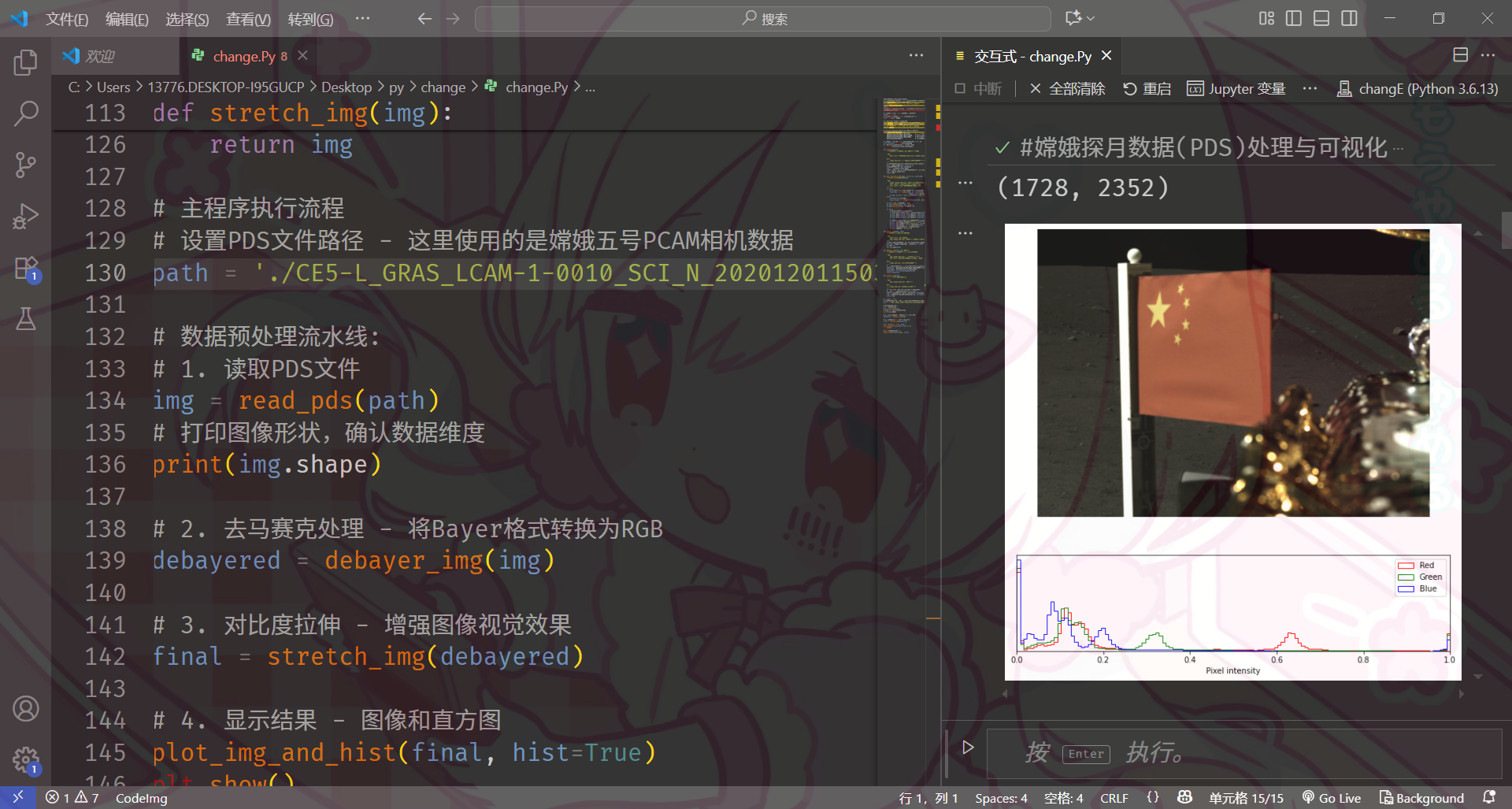
1 | d.label.to_dict()['Product_Observational'] |
- 如果一切顺利,它会像这样工作
向中国航天致敬 We salute China's Space Program.
评论
匿名评论隐私政策
✅ 你无需删除空行,直接评论以获取最佳展示效果